Text smarter.Sound like you,only better.
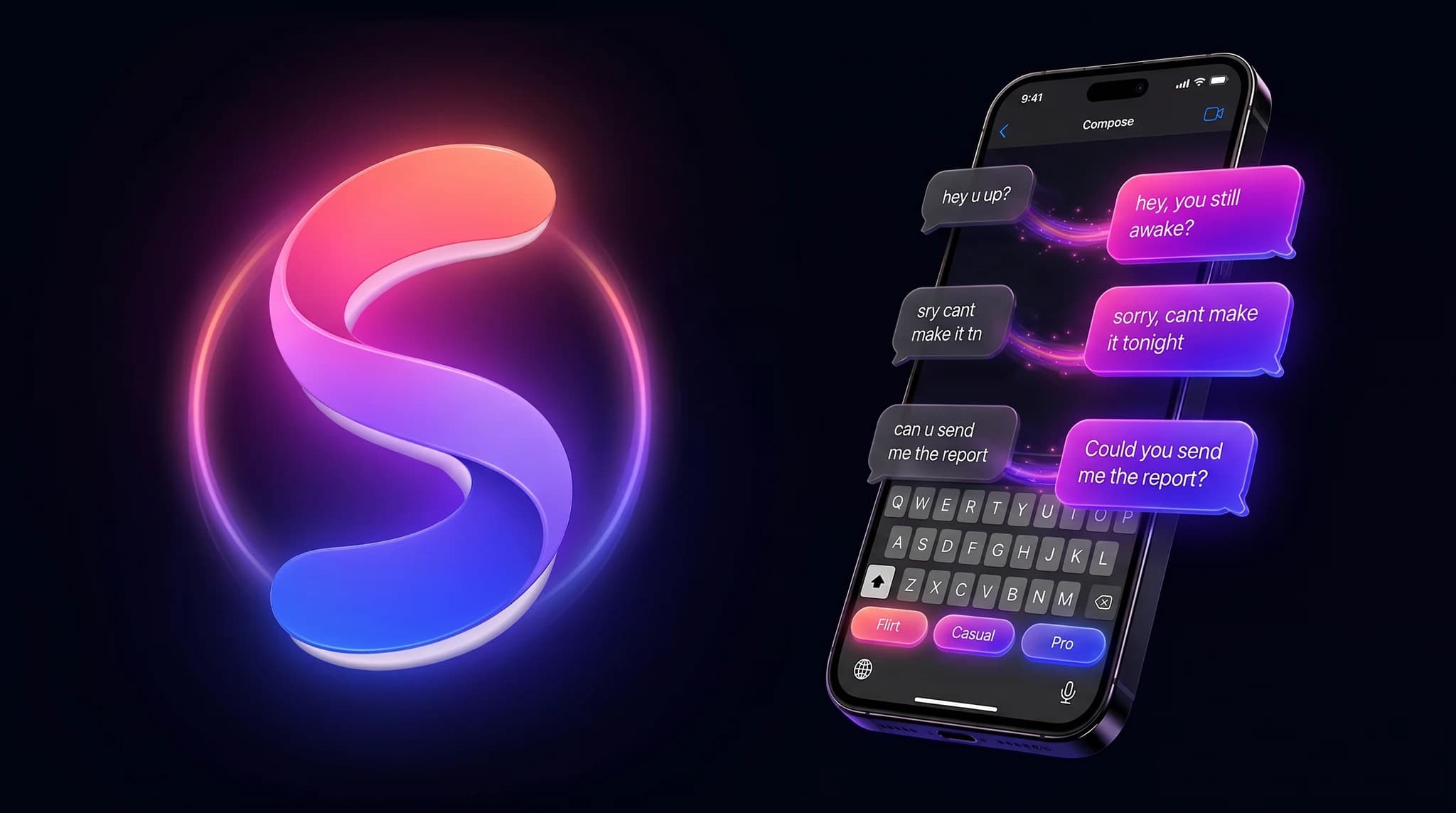
Swaytype rewrites any message into the tone you want. Flirty, casual, or professional. Right from your keyboard, in every app.
On Android? Swaytype lands on Google Play very soon. It’s on iPhone today.
Works in every app you already type in
Every text is a choice. Swaytype makes it the right one.
You type “ok sounds good,” delete it, type “sounds great!”, delete it, finally send something you half-regret. We’ve all been there.
Three taps. Every time.
Swaytype lives inside your keyboard, so it works in every app you already use. No copy, no paste, no context switch.
Type anything
Type the way you'd text a friend. Typos, lowercase, half thoughts. It all works.
Pick a tone
Flirt, Casual, or Professional. The mode strip sits above your keys, always a tap away.
Tap Improve
Your draft rewrites itself in place. Hit send, or tap again to try another tone.
One keyboard. Three voices.
Each mode is a different prompt, tuned for a different moment. Your voice stays. The friction leaves.
Warm, playful, a little cheeky.
Natural, relaxed, human.
Clear, polite, competent.
Speak every language. Sound like a local.
Tap the globe in your keyboard, pick a flag, send. Your message arrives in the target language phrased the way a native speaker would actually write it. No tourist-grade word swaps.
Built for speed. Built for trust.
The fine print most keyboards hide. We lead with it.
Sub-second rewrites
Powered by gpt-5-mini. Most drafts come back before you can blink.
Your data, your choice
Off by default. We never sell your text or use it to train third-party models. One-tap delete in Settings.
Works everywhere you type
If your keyboard shows up, Swaytype shows up. No copy, no paste, no app switching.
Any language you type
If your keyboard speaks it, Swaytype speaks it. Auto-detected, no settings.
Preserves your voice
Fixes what sounds off. Keeps what sounds like you.
One-tap undo
Your original draft is always one tap away. No regret sending.
How it compares
One keyboard does what four apps can’t.
Grammarly fixes grammar. Apple’s tools play it safe. Wispr is for your voice. Swaytype is the only one that shifts your tone, in any language, right where you type.
| Swaytype | Grammarly Keyboard | Apple Writing Tools | Wispr Flow | |
|---|---|---|---|---|
| Rewrites your message’s tone | Flirt, Casual, Pro | Grammar only | A few tones | Voice dictation |
| Flirty tone | ||||
| Translate as you type (40+ languages) | ||||
| Works on iPhone (iOS 16+) | Apple Intelligence only | |||
| Free to start | 25 rewrites/day | Built in | Limited |
Based on each product’s public description, 2026. Names belong to their owners.
Start free. Upgrade when you’re hooked.
25 free rewrites a day, forever. No credit card. No account friction.
- Unlimited rewrites
- 3-day free trial
- Cancel anytime
Everything you’re probably wondering.
What is Swaytype?
Swaytype is an AI keyboard for iPhone that rewrites your messages into the tone you want (flirty, casual, or professional) and translates them into 40+ languages, in one tap inside any app. It never stores what you type. Android is coming soon.
Is my text actually private?
Your draft is sent over TLS, rewritten on our servers, and discarded. If you opt in to help us improve, we keep a copy for up to 365 days so we can review prompt quality — toggle that off in Settings or wipe everything with one tap. We don't sell your text and we don't use it to train third-party models.
Why does Swaytype need Full Access?
Full Access is iOS's permission for internet access inside a keyboard. Without it, rewrites can't reach our servers. It doesn't mean we can see anything else — we only read what you tap Improve on.
Does it work offline?
Swaytype falls back to a normal keyboard offline. Rewrites need a connection. Typing, switching, and everything else works as usual.
Can I cancel anytime?
Yes. Subscriptions are managed through Apple — cancel from iOS Settings → Apple ID → Subscriptions. You keep Pro until the end of the billing period.
Will it change how I sound?
No. Every mode is tuned to preserve your voice — your contractions, slang, nicknames, inside jokes. We fix what sounds off and leave what sounds like you.
What languages does it support?
Type in any language your iOS keyboard supports: English, Spanish, Dutch, German, French, Japanese, Mandarin and more. English and Dutch are reviewed by native speakers; other languages use the model's native handling and work great in everyday use.
How does the translate button work?
Pick up to three target languages in onboarding (or in Settings). Inside the keyboard you tap the globe, pick a flag, and Swaytype rewrites your draft into that language right where the cursor is. The translation is idiomatic, phrased the way a native speaker would actually say it, not a word-for-word calque. There's also a separate button for translating messages someone else sent you: long-press to copy the message, then tap it to read the translation in your reading language.
Ready to text smarter?
Download Swaytype free. Rewrite your first message in the next 60 seconds.
On Android? Swaytype lands on Google Play very soon. It’s on iPhone today.

Scan to download
Opens the App Store on your phone
